

The Best Alternatives to Paper Gym Logs in 2026
Still carrying a notebook and pen around the gym floor? Discover the top digital alternatives to paper gym logs that match paper's speed without the manual math.

“Paper notebooks are fast and flexible, but searching for a 1-rep max from three months ago across 80 sweaty pages is a nightmare.”
For decades, the undisputed gold standard for tracking weightlifting sessions was a simple spiral composition notebook and a ballpoint pen.
Paper possesses undeniable advantages: it requires zero battery power, never crashes mid-workout, doesn’t bombard you with push notifications, and offers infinite formatting freedom. You write down the date, jot down your exercises, and record your sets. Simple, tactile, and effective.
However, paper comes with serious structural limitations in the modern era:
- Calculating your total volume over a month requires a calculator and manual labor.
- Finding your previous peak weight for incline dumbbell press means flipping back through dozens of pages.
- Paper notebooks can be lost, damaged by water bottles, or left behind in gym bags.
If you are ready to modernize your workout tracking but dread the thought of spending your rest periods tapping through rigid, drop-down heavy apps, here are the best digital alternatives to paper gym logs in 2026.
Comparison: Paper Notebook vs. Digital Alternatives
| Option | Input Speed | Freeform Flexibility | Automated Analytics | Data Security | Overall Score |
|---|---|---|---|---|---|
| Beau (Voice/Text AI) | ⚡ 3 – 5 Seconds | Unlimited (Natural Text) | Instant Charts & Trends | Cloud & Local Backup | ⭐⭐⭐⭐⭐ (5/5) |
| Paper Notebook | ✍️ 10 – 15 Seconds | Unlimited (Handwritten) | None (Manual Math) | Zero (Can be lost) | ⭐⭐⭐⭐☆ (4/5) |
| FitNotes (Android) | 📱 15 – 25 Seconds | Medium (Custom Items) | Clean Graphs | Local Backup | ⭐⭐⭐⭐☆ (4/5) |
| Apple Notes / Notion | ⌨️ 15 – 20 Seconds | Unlimited (Plain Text) | None (Manual Math) | Cloud Sync | ⭐⭐⭐☆☆ (3/5) |
| Strong App | 📱 30 – 45 Seconds | Rigid (Database-driven) | Comprehensive Graphs | Cloud Sync | ⭐⭐⭐☆☆ (3/5) |
1. Beau — The Natural-Language AI Digital Notebook
The primary reason notebook diehards refuse to switch to conventional fitness apps is friction. Standard apps force you to build templates before exercising, scroll through 500-item exercise lists, and adjust numerical steppers for every single set.
Beau solves this problem by retaining the exact freeform logic of a paper notebook while adding the power of artificial intelligence.
Instead of writing “Squat: 3 sets of 5 at 225 lbs” with a pen, you simply open Beau and dictate or type:
“Squat 225 lbs 3x5 at RPE 8”
Beau’s local natural-language processing engine instantly interprets your text, extracts the movement, weight, reps, and RPE, and saves the data to your history. You get all the speed and freedom of paper alongside automatic 1RM calculations, progression graphs, and searchable history.
- Key Features: Voice and natural text parsing; zero pre-workout template setup; automated progressive overload analytics.
- Pros: Fast as a paper log; no menu navigation; works offline on-device.
- Cons: iOS only currently.
- Best For: Paper notebook loyalists who want maximum speed and zero app bloat.
2. FitNotes — The Minimalist Digital Ledger
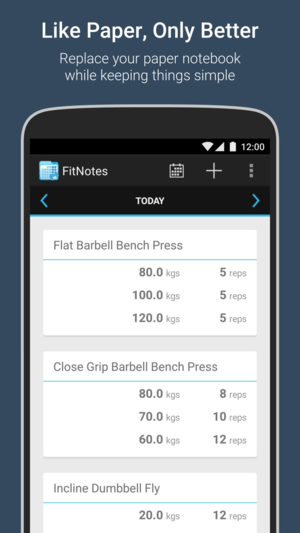
For Android users who love the straightforward nature of a paper ledger, FitNotes is a legendary tool. It contains zero social feeds, zero advertising, and no subscription paywalls.
FitNotes presents a clean, database-driven interface where you punch in your exercise numbers. It acts like a digital ledger, recording your weights and reps with minimal visual clutter.
- Key Features: Category-based exercise catalog; volume charting; local data backups.
- Pros: 100% free with no ads; lightweight and privacy-focused.
- Cons: Android only; interface looks somewhat dated; requires manual tapping for every set.
- Best For: Android lifters looking for a clean, privacy-first digital ledger.
3. Apple Notes or Notion — The DIY Digital Notebook
Why use a specialized fitness application at all? Many lifters replicate their physical notebook by creating a dedicated running note in Apple Notes or setting up a database in Notion.
You simply create a page for each workout date and type out your lifts freeform using your smartphone keyboard.
- Key Features: Cross-device synchronization; full text formatting; complete user control.
- Pros: 100% free; already installed on your phone; infinitely customizable.
- Cons: Provides zero automated math; cannot plot volume graphs or calculate 1RM progression over time.
- Best For: Lifters who want a literal digital copy of a paper notebook and don’t care about automated analytics.
4. Strong — The Polished Traditional Tracker
If you are ready to fully embrace a structured digital experience with pre-set templates, Strong remains one of the cleanest traditional trackers available.
Strong replaces freeform writing with structured exercise lists, set check-boxes, and built-in rest timers. While it requires considerably more screen interaction than Beau or a paper log, its polished interface makes template logging straightforward.
- Key Features: Plate calculator; built-in rest timers; interactive progression charts.
- Pros: Clean UI; comprehensive exercise database; Apple Watch integration.
- Cons: Free tier restricts custom routines; routine building can feel tedious mid-workout.
- Best For: Lifters who follow strict, unvarying routine templates week after week.
Why Traditional Apps Fail Paper Log Loyalists (And How AI Solves It)
Paper notebook users view their phone as a tool that should serve them, not demand their attention. Traditional fitness apps fail paper loyalists because they reverse this relationship — forcing the lifter to spend 45 seconds of every rest period managing UI state.
By leveraging natural-language processing, Beau bridges the gap. It treats text and speech as the primary interface, eliminating dropdowns while providing the rich data visualization that paper logs could never offer.
Decision Guide: Which Alternative Should You Choose?
- If you want the speed of paper with automatic charts: Choose Beau. Dictate your sets in 3 seconds and put your phone away.
- If you are an Android user who hates clutter: Choose FitNotes. Simple, free, and local.
- If you want a free text list with no data tracking: Choose Apple Notes.
- If you follow rigid, unchanging routines: Choose Strong.
Ditch the sweaty notebook without losing your speed. Download Beau for iOS and upgrade your gym logging today.